When developing complex models, understanding how calculations fit together is essential. Whether you’re debugging an unexpected result, assessing the impact of a change, or simply getting familiar with an existing model, you need to be able to see how model objects relate to one another.
Mo.net’s Results Precedents and Dependents capability already lets you trace a calculation result back through the components and values that contributed to it. In Mo.net 7.8.0, we’ve extended this visibility with Used By / Depends On functionality for Inputs, Parameters and Functions.
Used By shows you where a selected object is referenced elsewhere in the model, while Depends On shows you which model objects it relies on. You can explore these relationships either as a list or visually in a dependency diagram.
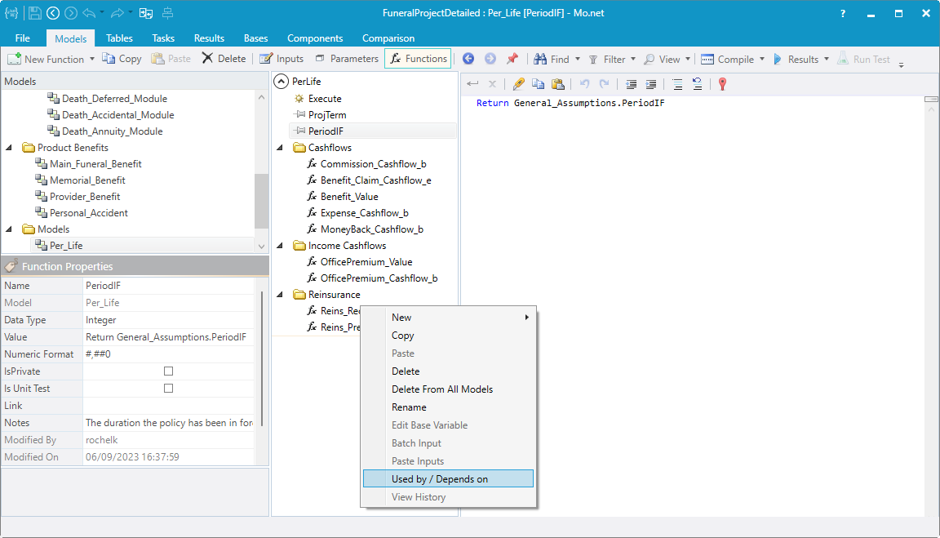
Using the feature is simple. Select a model in the Models tree, choose the Input, Parameter or Function you’re interested in, then right-click and select Used By / Depends On. In this example, we’re using the FuneralProjectDetailed sample project. We’ve selected the Reins_Recovery_e function in the Per_Life model.
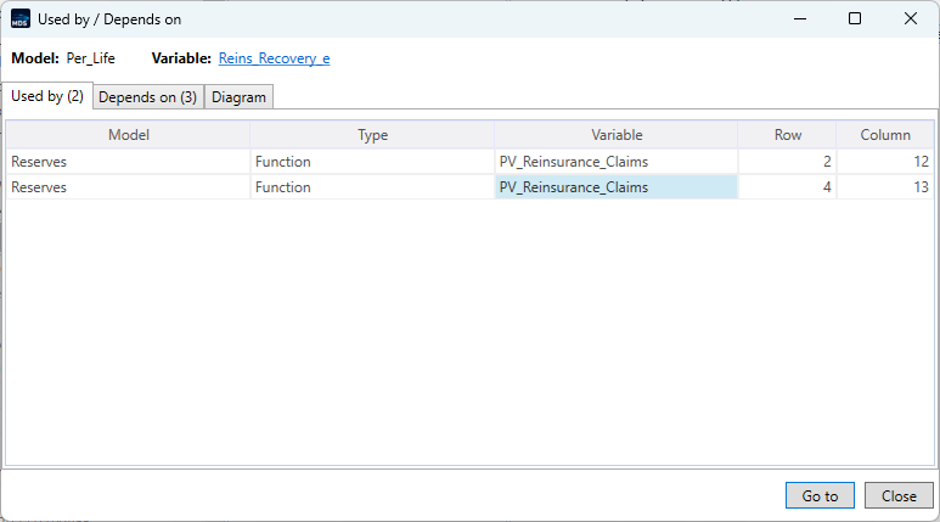
The Used By view immediately shows two references to this function. Both occur within PV_Reinsurance_Claims in the Reserves model, on different rows.
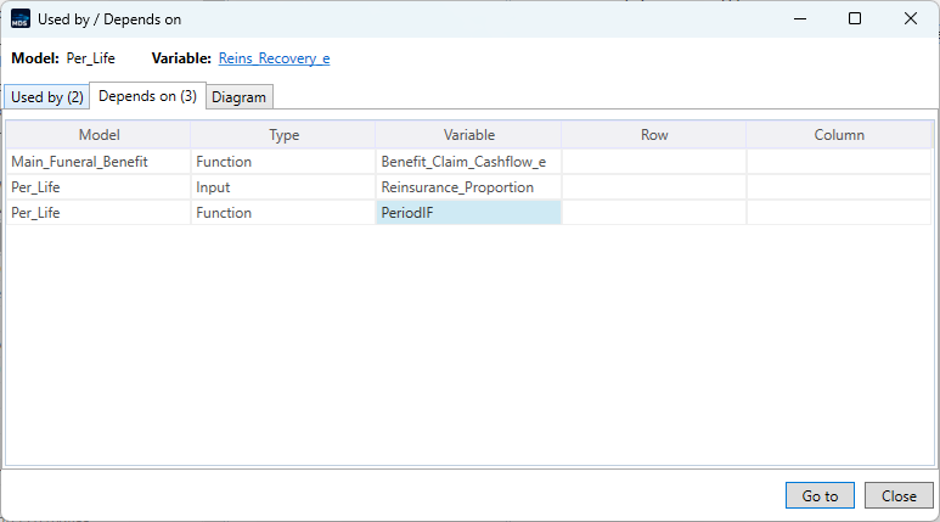
Switching to Depends On shows the other side of the relationship. Reins_Recovery_e has three dependencies, and the view identifies both the objects and the models in which they reside.
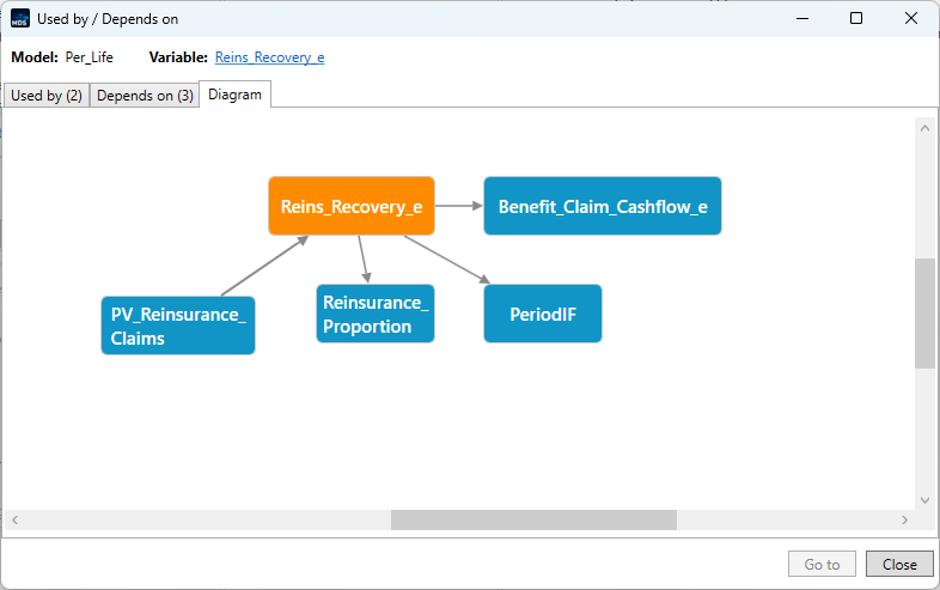
For a more visual overview, the Diagram tab brings both directions together in a single view. This makes it much easier to see the selected object’s place within the wider model and understand the relationships around it.
With Used By / Depends On, you can explore model relationships without manually searching through functions and references. This makes it easier to understand unfamiliar models, investigate calculation behaviour and assess the potential impact of changes before making them.
There are many different types of testing associated with software development and the development of calculations for financial models. Unit testing, functional testing, regression testing, integration testing and performance testing are some of the most common. Testing should always be carried out before a new version is deployed to users.
Unit testing involves testing individual units of a financial model in isolation. In the case of Mo.net models, these units would usually be individual functions. Unit tests verify that each function produces the expected results for a defined set of inputs.
This is particularly useful when developing or modifying models, as unit tests can help identify calculation errors early and provide confidence that existing functionality continues to behave as expected after changes are made.
Prior to Mo.net 7.8, functionality was already available for creating unit tests in the External Component area. Mo.net 7.8 now also includes functionality that makes it easy to write and execute unit tests for any function you wish to test.
Creating a unit test
I will run through an example using a function that is already present in one of our sample projects. The project is ConventionalModelProject, which can be found in the backstage area under New and Installed.
The top model, Disc_CF_Model contains a function that calculates the policy year. We are going to write a unit test to check the boundary points-in particular, when the policy year should change from 1 to 2.
The code for the Pol_Year function looks like this:
This means that when t = 0, Pol_Year is equal to 0. From t = 1 to t = 12, Pol_Year should equal 1, and from t = 13 to t = 24, it should equal 2.
Boundary testing
When writing unit tests, it is particularly useful to test values at and around boundaries where the expected result changes. Errors are often more likely to occur at these transition points-for example, because of an incorrect comparison operator or an off-by-one error.
In this example, the important boundary is between t = 12 and t = 13, where Pol_Year changes from 1 to 2. Testing values on either side of this boundary confirms that t = 12 is still assigned to policy year 1 and that t = 13 is correctly assigned to policy year 2. It is also useful to test other boundaries, such as t = 0 and t = 1, rather than testing only values in the middle of a range.
Thinking about boundaries in this way can help when creating unit tests for other model functions. Wherever a calculation changes behaviour at a particular value, consider testing the value immediately before the boundary, the boundary itself and the value immediately after it.
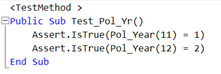
We add a new function called Pol_Year_UT. To check that the boundary values are calculated correctly, we use the following code:
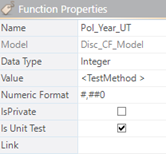
We also need to ensure that the Is Unit Test function property is selected:
Running the unit test
We can now run our unit test by clicking the Run Test button on the Function menu bar:
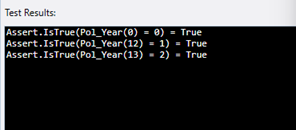
The results are displayed in the box below the code:
Running multiple unit tests
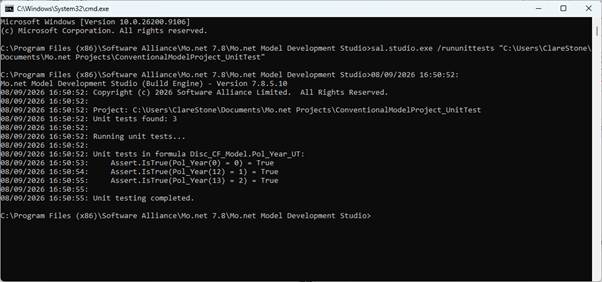
If a project contains multiple unit tests, they can all be run from the command line. To do this, use the /rununittests switch with the Model Development Studio executable and point it to the project for which you want to run the unit tests.
The results are then sent to the console, as shown below:
This provides a convenient way to run a project’s unit tests together, helping to confirm that calculations continue to produce the expected results as the model is developed and changed.
Conculsion
Unit testing provides a simple but effective way to check that individual model functions are producing the expected results. By creating tests as functions are developed, and focusing particularly on boundary conditions and other key calculation points, potential issues can be identified early and changes can be made with greater confidence. The unit testing functionality in Mo.net 7.8 makes it easier to incorporate these checks into the model development process and to rerun them whenever a model is changed.
Last year I wrote a series of articles discussing various ways in which Mo.net could be used in conjunction with Python to deliver modelling solutions leveraging the best of both worlds. In this latest article I will demonstrate another way of interacting directly with the Python kernel directly from a Mo.net project.
One of the great strengths of the Mo.net financial modelling platform is that it provides developers with access to the entire .NET ecosystem. This means that integrating with external libraries doesn’t have to involve writing temporary files, launching command-line processes, or parsing console output.
To use a Python library such as NumPy, Pandas, SciPy, or a bespoke machine learning model from within a Mo.net solution, the traditional solution is to invoke the Python script from a Mo.net task. But there is a more elegant way using Python.NET.
In this article I’ll demonstrate how to call Python functions directly from a Mo.net model using Python.NET, eliminating the overhead and complexity of shelling out to a separate Python process.
Why Avoid Shelling Out?
A common integration pattern is something like this:
Export data to CSV or JSON.
Launch Python script using the Mo.net Python task (so called “shelling out”)
Wait for Python to finish.
Read the output files back into the next Mo.net task.
Although this works, it has several disadvantages:
Significant process startup overhead.
Complicated error handling.
Temporary file management.
Difficult debugging.
Limited interaction with Python objects.
Poor performance when Python needs to be called repeatedly.
Python.NET embeds the Python interpreter directly inside your Mo.net project allowing Python functions to be called almost as if they were native Mo.net methods.
What is Python.NET?
Python.NET is an open-source bridge between .NET and CPython. Rather than translating Python code into .NET, it hosts the actual CPython runtime inside your Mo.net project. This means you can use virtually any Python package that works with your installed Python environment, including:
NumPy
Pandas
SciPy
scikit-learn
TensorFlow
PyTorch
Proprietary Python modules
Prerequisites
The following components need to be downloaded / installed / configured before attempting to run the sample Mo.net project.
Python 3.14.0 or later (3.14.6 used in this example)
This should be installed before attempting to use Python.net with Mo.net.
Use the standalone installer if possible. Please perform a custom installation if possible and install Python into C:\Python314. Other installation locations are fine, but the sample code will need amending accordingly.
Python.NET
The easiest approach is to download Python.NET directly from the Nuget source:
Click the Download Package link on the right hand side of the page and make a note of where the package has been downloaded (e.g. C:\Downloads).
Once the package has been downloaded, we need to unpack it. To do this create a folder in which to put the package contents, e.g. C:\Downloads\PythonNET.
Now unpack the contents of the Python.NET nuget package (this assumes version 3.1.0) into the folder created above by running this command from a Command or PowerShell prompt:
tar -xf "pythonnet.3.1.0.nupkg" -C "C:\Downloads\PythonNET"
.NET Framework 4.8 Components
We now need to ensure that some .NET Framework 4.8 components are installed. To do this we need to download the .NET Framework 4.8 offline installer from this location:
Once downloaded simply run the installer to install / confirm installation of .NET Framework 4.8 components.
With Python, PythonNET and .NET Framework 4.8 downloaded and installed we can now configure Mo.net to use them.
Preparing a Simple Python Script / Function
Before preparing the Mo.net project to use the Python.NET integration, we first need to prepare a simple Python function to use in Mo.net.
To do this, launch IDLE (the default Python code editor) and enter the following two line function:
def square(x):
    return x * x
Save this with a filename of mysquare.py in the C:\Python314 folder.
Preparing the Mo.net Project
We are now ready to create a Mo.net project that uses Python.NET to access the Python function created above.
Start by creating a blank Mo.net project in Mo.net Model Development Studio, making a note of the location used as we will need this shortly.
Copy the following files into the Mo.net project folder created above: C:\Downloads\PythonNET\lib\netstandard2.0\Python.Runtime.dll, and C:\Windows\Microsoft.NET\Framework64\v4.0.30319\netstandard.dll (typical location, but it can vary)
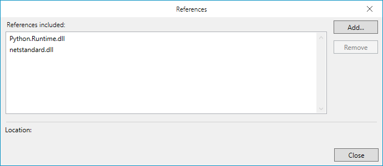
Return to Mo.net Model Development Studio and add references to the two DLLs copied above by clicking on the References button in the Backstage (Info) view and selecting the files copied into the project folder.
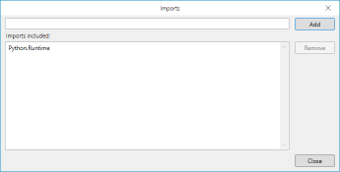
Finally we need to add into the Imports dialog (References -> Imports) Python.Runtime:
We are now ready to test things with a simple solution
Simple Test
Create a new Group Projection task in the Mo.net project.
Add this code into the code editor window and run it:
Sub Run()

    Runtime.PythonDLL = "C:\Python314\python314.dll"

    PythonEngine.Initialize()

    Using Py.GIL()

        Dim sys = Py.Import("sys")
        Dim path = sys.GetAttr("path")
        path.InvokeMethod("append", New PyString("C:\Python314"))

        Dim pyModule = Py.Import("mysquare")

        Dim result = pyModule.InvokeMethod("square", New PyObject() {New PyInt(42)} )

        Log.Progress("Result = " & (result.As(Of Integer)()).Tostring())

    End Using

    PythonEngine.Shutdown()

End Sub
What’s Going On?
The key elements of the Mo.net code are as follows.
Line
Commentary
3
Tell Python.NET where the Python runtime DLL is located. This must point to the correct version of pythonXX.dll installed on the machine.
5
Start the Python interpreter so it can be used from Mo.net.
7
Acquire Python’s Global Interpreter Lock (GIL). The GIL must be held whenever interacting with Python objects
9
Import Python’s built-in “sys” module.
10
Get the “path” list from the sys module. sys.path contains the directories that Python searches for modules.
11
Add the Python installation folder to sys.path. This allows Python to locate modules stored in this directory.
13
Import the custom Python module named “mysquare.py”. The file must exist in one of the directories listed in sys.path.
15
Call the Python function “square” from the imported module. A Python integer (42) is passed as the function argument. The return value is stored as a PyObject.
17
Convert the returned PyObject into a Mo.net Integer and write the result to the application log.
19
Release the GIL automatically when leaving this block.
21
Shut down the Python interpreter and release its resources. This should be called when Python is no longer needed.
Conclusion
I hope this series of articles has been useful and has helped illustrate the flexibility of the Mo.net platform. If there are any more Python integration use cases that you would like me to explore, please get in touch.
As actuarial models continue to grow in complexity, the volume of data they process has increased dramatically. Whether you’re building pricing models, performing reserving analyses, running capital calculations or producing IFRS 17 results, the efficiency of your data layer has become just as important as the modelling logic itself.
For many years, CSV files have been the default way of exchanging data between systems. They’re simple, universally supported and easy to inspect with a spreadsheet or text editor. However, as datasets have grown into the millions of records, the limitations of CSV have become increasingly apparent.
That’s where Apache Parquet comes in.
Now natively supported in Mo.net (from 7.8 onwards), Parquet is a modern file format designed specifically for analytical workloads. It enables actuarial models to read data more efficiently, consume less storage and integrate seamlessly with today’s wider analytics ecosystem.
What is a Parquet File?
Unlike a CSV file, a Parquet file isn’t designed to be read by people. It’s a binary format, so opening one in a text editor simply produces unreadable characters. Instead, Parquet is designed for software.
The easiest way to understand the difference is to compare how the same data is stored.
A CSV file stores information row by row:
PolicyID
Age
Premium
Claims
1001
42
425.50
1
1002
35
310.25
0
1003
57
689.10
2
1004
29
275.00
0
Internally, a Parquet file stores the same information more like this:
This isn’t the actual binary structure, but it illustrates the key concept: Parquet stores data by column rather than by row.
That difference unlocks many of the performance benefits that make Parquet so attractive for actuarial modelling.
Faster Model Execution
Consider a pricing model that only requires three variables:
Premium
Claim Count
Exposure
A traditional CSV file might contain dozens or even hundreds of columns:
PolicyID
Age
Vehicle
Region
Premium
Claim Count
Exposure
Occupation
…
When Mo.net reads a CSV, every column has to be loaded from disk before the unwanted ones can be discarded.
With Parquet, Mo.net can read only the columns it needs.
Instead of loading the entire file, it simply retrieves:
Premium
Claim Count
Exposure
while skipping everything else.
For small datasets the difference may be negligible. For experience files containing millions of policies, the reduction in disk I/O can significantly improve loading and execution times.
Smaller Files, Lower Storage Costs
Another major advantage of Parquet is file size. The format includes highly efficient compression and encoding techniques, meaning Parquet files are often 50–90% smaller than equivalent CSV files, depending on the characteristics of the data.
For actuarial teams storing years of policy history, claims experience, assumptions and model outputs, these savings can quickly become substantial.
Smaller files also mean:
Faster backups
Faster transfers between systems
Lower cloud storage costs
Quicker loading into analytical platforms
Better Data Quality Through Strong Typing
CSV files only contain text. Every application importing a CSV has to decide whether each column represents a number, date or piece of text. Regional settings, missing values and formatting differences can all introduce unexpected issues.
Parquet stores the data type alongside the data itself.
Dates remain dates.
Numbers remain numbers.
Boolean values remain Boolean.
This reduces import errors and removes much of the repetitive data cleaning that often accompanies actuarial workflows.
Built for Large-Scale Analytics
Parquet has become the standard storage format across modern analytics platforms, including Python, R, DuckDB, Spark, Databricks, Microsoft Fabric and many cloud data warehouses. Because Mo.net supports Parquet directly, the same dataset can be shared across multiple analytical tools without exporting separate copies in different formats. This creates a single, consistent source of data across pricing, reserving, capital modelling and reporting teams.
Handling Large Experience Files Efficiently
Many actuarial investigations involve datasets containing tens or hundreds of millions of records. Parquet includes several features specifically designed for these workloads:
Rich metadata allows software to skip irrelevant sections of a file.
Partitioning makes it easy to work with individual years, products or business units.
Together, these capabilities allow Mo.net to process large datasets far more efficiently than traditional text-based formats.
A Better Foundation for Automated Data Pipelines
Modern actuarial modelling increasingly forms part of automated production processes. Data flows from operational systems into data lakes, through validation pipelines, into actuarial models and finally into reporting platforms.
Parquet fits naturally within these workflows because it preserves both data structure and data types. The result is more reliable automated processes, fewer manual interventions and reduced risk of data formatting issues disrupting production runs.
Why It Matters for Mo.net Users
Support for Parquet within Mo.net allows actuarial teams to benefit from industry-standard data technology without changing the way they build models.
Users can take advantage of:
Faster data loading
Reduced model execution times
Smaller data files
Lower memory consumption
More reliable handling of data types
Better integration with modern analytics platforms
Improved scalability as datasets continue to grow
These benefits apply across pricing, reserving, capital modelling, IFRS 17 and experience investigations.
Looking Ahead
The actuarial profession is rapidly embracing larger datasets, cloud-native architectures and increasingly sophisticated analytical techniques. Parquet has emerged as one of the foundational technologies enabling that transition.
By supporting Parquet, Mo.net gives actuarial teams access to a faster, more scalable and more robust way of managing model data. Rather than treating data loading as a bottleneck, modellers can focus on what matters most—developing better models and delivering insights more quickly.
For organisations looking to modernise their actuarial workflows, adopting Parquet isn’t simply a technical upgrade. It’s an investment in a data platform that’s designed for the future.
By 2035, raw compute is no longer something modellers think about. Cloud-native execution, massive parallelism, GPU acceleration, and on-demand elasticity mean that “Can we afford to run this?” quietly disappears as a question. What matters instead is how fast insight cycles complete, not how long individual runs take.
This isn’t about bigger models. It’s about orders of magnitude more exploration, i.e. thousands or millions of scenarios becoming routine rather than exceptional.
Once computation becomes effectively infinite, the limiting factor moves somewhere much closer to home.
2. Models Become Modular, Not Monolithic
The 2035 model is unlikely to be a single engine. It’s a composition of components: mortality, lapses, expenses, assets, reinsurance, capital, management actions, each separable, swappable, and independently testable.
This modularity is what allows:
Continuous evolution without destabilising everything
Parallel development by different teams
AI to reason about cause and effect instead of just outputs
Monolithic “all-in-one” engines struggle here. Modular architectures thrive. This is one reason why platforms built around transparent, composable actuarial logic, like Mo.net, age better than those built around opaque execution pipelines.
3. Structured Transparency Replaces Black Boxes
In 2035, transparency is not a philosophical preference but an operational requirement. When models are always on, feeding real decisions, nobody accepts “trust the engine” as an answer. Regulators, boards, and capital providers expect traceability – what changed, why it mattered, and where judgement entered.
This requires:
Explicit assumption structures
Machine-readable model logic
Built-in explainability, not bolt-on documentation
Ironically, this level of transparency is easier to achieve with disciplined platforms than with sprawling bespoke codebases.
4. AI Becomes a Modelling Co-Pilot, not a Feature
AI in 2035 is not a separate tool you “use”, but an embedded capability:
Highlighting sensitivities before you ask
Surfacing non-linear behaviour automatically
Comparing today’s results to historical patterns
Drafting explanations, not conclusions
Critically, AI does not decide what assumptions are right but decides where your attention is most valuable. However, this only works if models are fast, structured, and consistent. AI doesn’t cope well with bespoke chaos. It amplifies both good architecture and bad.
5. Data Pipelines Become Boring
In 2026, data integration still consumes a significant amount of end-to-end modelling effort. But by 2035, data pipelines are dull, standardised, and reliable. Not because data got simpler, but because firms finally invested in:
Clean interfaces between data and models
Clear ownership of transformations
End-to-end lineage and business glossaries
When data stops being the daily fire fight, modelling teams can finally focus on thinking again.
6. Governance Moves from Gates to Guardrails
Instead of governance being about approval gates, i.e. “has this run been signed off?”, it becomes about guardrails. This is a subtle but profound shift.
Which assumptions are allowed to move?
Which ranges trigger escalation?
What behaviour is automatically logged and explainable?
Technology enables this by making behaviour observable rather than controlled through friction. Fast models demand smarter governance, not heavier governance.
7. Human Interfaces Catch Up with Machine Speed
One of the least discussed enablers is interface design. In 2035, actuaries don’t scroll through output files. They interact with surfaces, ranges, and dynamic explanations. Visualisation isn’t just cosmetic. The model speaks in shapes and responses, not tables. Without this, even the fastest model is wasted.
Conclusion
Unfortunately, none of these technologies matter in isolation. The real enabler of the 2035 vision is coherence, i.e. models that are fast enough for exploration, structured enough for AI, transparent enough for trust, and governed enough for reality.
That’s why the future doesn’t belong to:
Fully bespoke open-source estates, or
Fully opaque vendor platforms
It belongs to modelling environments that blend discipline with freedom and treat technology as a way to remove friction, not add ceremony.
y 2035, no one in life insurance still talks about “running the model”.
That phrase belongs to an earlier era; a time when modelling was an event rather than a capability, when results arrived hours or days after questions were asked, and when insight lagged behind decision-making.
In 2035, modelling is simply there. Always on. Always available. And quietly shaping almost every material decision a life insurer makes.
Mention artificial intelligence in an insurance context and the conversation usually jumps straight to extremes. Either AI is about to replace actuarial judgement altogether, or it is dismissed as another technology trend that regulators will never fully allow into the heart of financial reporting.
Every few years, life insurance modelling circles back to a familiar idea: “Surely we can build this ourselves now?”
Open-source languages are mature. Cloud infrastructure is cheap and elastic. Numerical libraries are faster than ever. On the surface, the case for fully open-source financial modelling feels stronger than it ever has.
And yet, time and again, large-scale internal build attempts quietly stall, get re-scoped, or end up re-introducing vendor platforms through the back door. This isn’t because open source has failed actuarial modelling. It’s because life insurance modelling turns out to be much more than code.
For most UK life insurers, the last decade of financial modelling has been defined by regulation-driven urgency. Solvency II reshaped capital thinking. IFRS 17 then arrived and demanded industrial-scale reporting engines, new data flows, and an unprecedented level of modelling governance.
Over the last decade a number of free / open source database environments such as PostgreSQL and MySQL have emerged to challenge the traditional players like Microsoft SQL Server and Oracle. Like PostgreSQL and MySQL, SQLite has found favour with lone developers using limited data sets or developing lightweight applications. Even users of SQL Server Express Edition have moved to SQLite, where compatibility with the full edition of SQL Server isn’t a significant requirement.