When developing complex models, understanding how calculations fit together is essential. Whether you’re debugging an unexpected result, assessing the impact of a change, or simply getting familiar with an existing model, you need to be able to see how model objects relate to one another.
Mo.net’s Results Precedents and Dependents capability already lets you trace a calculation result back through the components and values that contributed to it. In Mo.net 7.8.0, we’ve extended this visibility with Used By / Depends On functionality for Inputs, Parameters and Functions.
Used By shows you where a selected object is referenced elsewhere in the model, while Depends On shows you which model objects it relies on. You can explore these relationships either as a list or visually in a dependency diagram.
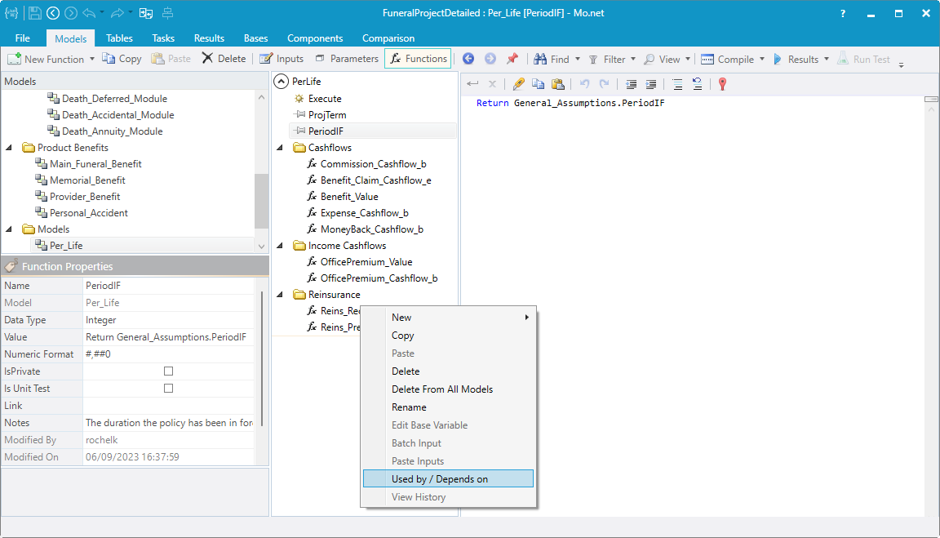
Using the feature is simple. Select a model in the Models tree, choose the Input, Parameter or Function you’re interested in, then right-click and select Used By / Depends On. In this example, we’re using the FuneralProjectDetailed sample project. We’ve selected the Reins_Recovery_e function in the Per_Life model.
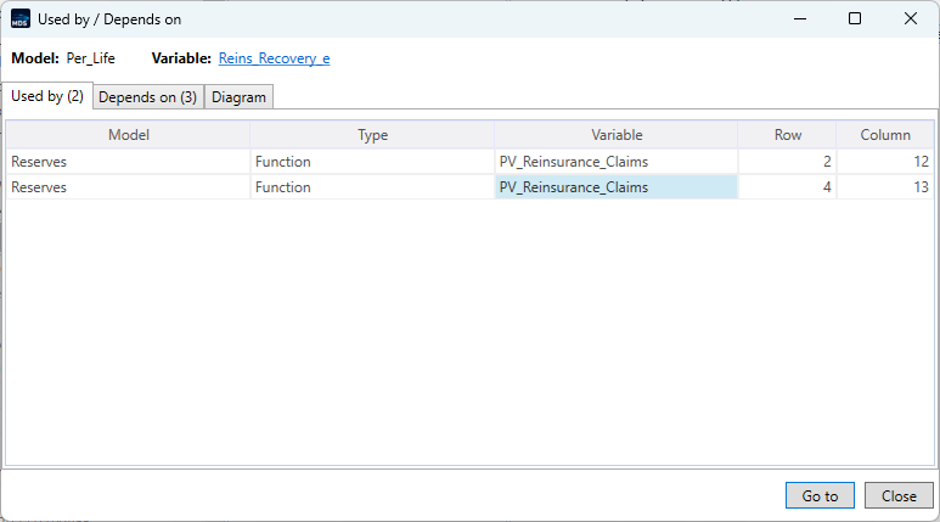
The Used By view immediately shows two references to this function. Both occur within PV_Reinsurance_Claims in the Reserves model, on different rows.
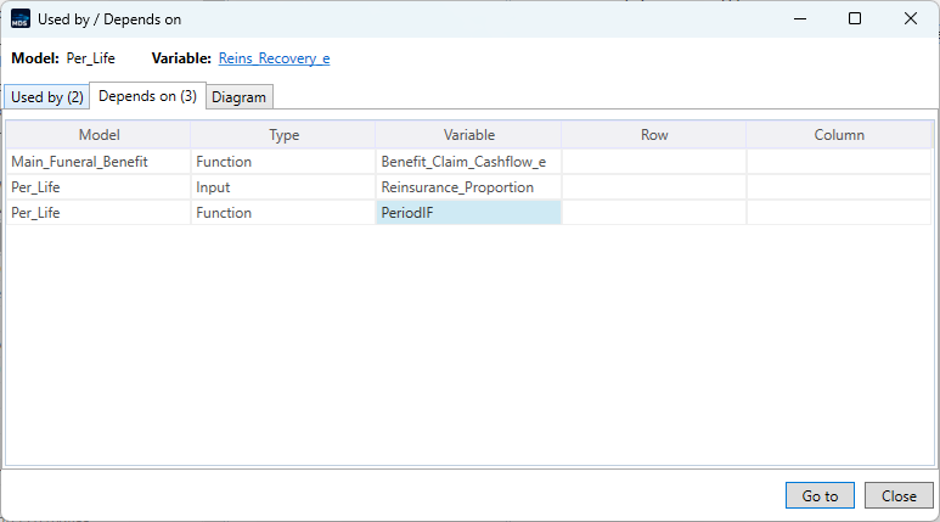
Switching to Depends On shows the other side of the relationship. Reins_Recovery_e has three dependencies, and the view identifies both the objects and the models in which they reside.
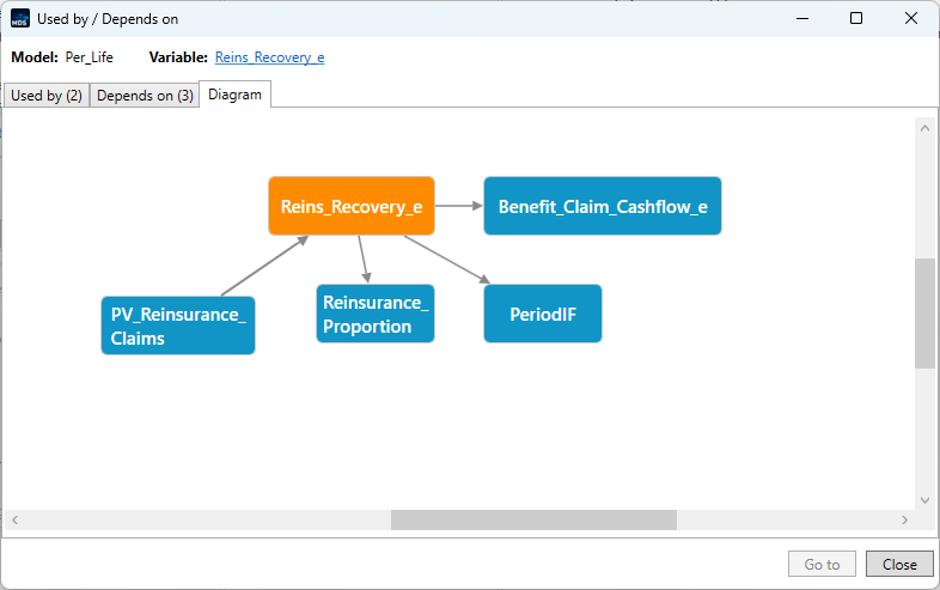
For a more visual overview, the Diagram tab brings both directions together in a single view. This makes it much easier to see the selected object’s place within the wider model and understand the relationships around it.
With Used By / Depends On, you can explore model relationships without manually searching through functions and references. This makes it easier to understand unfamiliar models, investigate calculation behaviour and assess the potential impact of changes before making them.
There are many different types of testing associated with software development and the development of calculations for financial models. Unit testing, functional testing, regression testing, integration testing and performance testing are some of the most common. Testing should always be carried out before a new version is deployed to users.
Unit testing involves testing individual units of a financial model in isolation. In the case of Mo.net models, these units would usually be individual functions. Unit tests verify that each function produces the expected results for a defined set of inputs.
This is particularly useful when developing or modifying models, as unit tests can help identify calculation errors early and provide confidence that existing functionality continues to behave as expected after changes are made.
Prior to Mo.net 7.8, functionality was already available for creating unit tests in the External Component area. Mo.net 7.8 now also includes functionality that makes it easy to write and execute unit tests for any function you wish to test.
Creating a unit test
I will run through an example using a function that is already present in one of our sample projects. The project is ConventionalModelProject, which can be found in the backstage area under New and Installed.
The top model, Disc_CF_Model contains a function that calculates the policy year. We are going to write a unit test to check the boundary points-in particular, when the policy year should change from 1 to 2.
The code for the Pol_Year function looks like this:
This means that when t = 0, Pol_Year is equal to 0. From t = 1 to t = 12, Pol_Year should equal 1, and from t = 13 to t = 24, it should equal 2.
Boundary testing
When writing unit tests, it is particularly useful to test values at and around boundaries where the expected result changes. Errors are often more likely to occur at these transition points-for example, because of an incorrect comparison operator or an off-by-one error.
In this example, the important boundary is between t = 12 and t = 13, where Pol_Year changes from 1 to 2. Testing values on either side of this boundary confirms that t = 12 is still assigned to policy year 1 and that t = 13 is correctly assigned to policy year 2. It is also useful to test other boundaries, such as t = 0 and t = 1, rather than testing only values in the middle of a range.
Thinking about boundaries in this way can help when creating unit tests for other model functions. Wherever a calculation changes behaviour at a particular value, consider testing the value immediately before the boundary, the boundary itself and the value immediately after it.
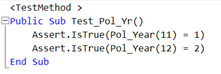
We add a new function called Pol_Year_UT. To check that the boundary values are calculated correctly, we use the following code:
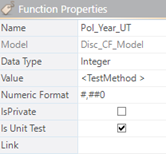
We also need to ensure that the Is Unit Test function property is selected:
Running the unit test
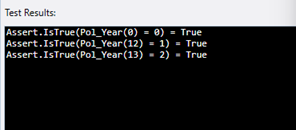
We can now run our unit test by clicking the Run Test button on the Function menu bar:
The results are displayed in the box below the code:
Running multiple unit tests
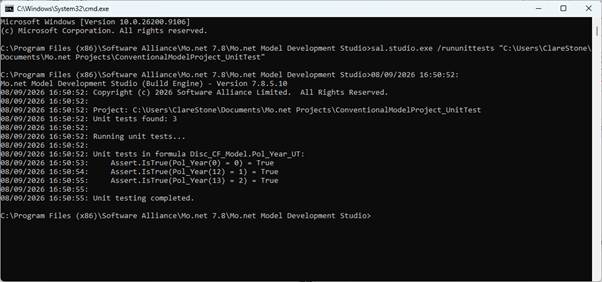
If a project contains multiple unit tests, they can all be run from the command line. To do this, use the /rununittests switch with the Model Development Studio executable and point it to the project for which you want to run the unit tests.
The results are then sent to the console, as shown below:
This provides a convenient way to run a project’s unit tests together, helping to confirm that calculations continue to produce the expected results as the model is developed and changed.
Conculsion
Unit testing provides a simple but effective way to check that individual model functions are producing the expected results. By creating tests as functions are developed, and focusing particularly on boundary conditions and other key calculation points, potential issues can be identified early and changes can be made with greater confidence. The unit testing functionality in Mo.net 7.8 makes it easier to incorporate these checks into the model development process and to rerun them whenever a model is changed.
Every few years, life insurance modelling circles back to a familiar idea: “Surely we can build this ourselves now?”
Open-source languages are mature. Cloud infrastructure is cheap and elastic. Numerical libraries are faster than ever. On the surface, the case for fully open-source financial modelling feels stronger than it ever has.
And yet, time and again, large-scale internal build attempts quietly stall, get re-scoped, or end up re-introducing vendor platforms through the back door. This isn’t because open source has failed actuarial modelling. It’s because life insurance modelling turns out to be much more than code.
For most UK life insurers, the last decade of financial modelling has been defined by regulation-driven urgency. Solvency II reshaped capital thinking. IFRS 17 then arrived and demanded industrial-scale reporting engines, new data flows, and an unprecedented level of modelling governance.
The U.S. insurance industry is undergoing a major shift in how it calculates statutory reserves for fixed annuity products. Leading this transformation is VM-22, a new reserving standard that officially became mandatory in 2025 for many non-variable annuities. With its adoption, insurers are moving away from traditional formula-based methods and embracing a more nuanced, principle-based approach—one that better reflects the complexity and risks of modern annuity products.
In the life insurance industry, financial models—often built in complex spreadsheets—play a critical role in pricing, reserving, capital management, and strategic decision-making. These models are sophisticated, calculation-heavy, and require rigorous assumptions and projections over long time horizons. However, the very complexity that makes these spreadsheets powerful also makes them difficult to maintain, understand, audit, or transfer between teams—especially in the absence of proper documentation.
Mo.net Quotations Service can be integrated to work with Quotation portals, Policy Admin Systems, Underwriting systems and a variety of other systems in use across the insurance enterprise. Until recently, clients using Mo.net Quotations service have typically hosted it on premise for internal use and therefore required limited security features. However, with the increased mobilisation of activities to the cloud, security has come under much more scrutiny.
As the complexity of models used by insurance enterprises continues to escalate, and the reliance placed on such models continues to grow, the importance of ensuring that models operate as intended comes under increased scrutiny.
In the rapidly evolving landscape of the insurance industry, efficient and secure communication between stakeholders is more critical than ever. The Origo Messaging Standard has emerged as a powerful solution to streamline these interactions, particularly for insurance contracts.
Despite the importance of assumption management, many organisations still struggle to find a robust yet flexible solution to the problem and lack an effective assumption management framework.